Yes, an AI service desk agent can triage support emails in Azure Logic Apps. We built a small sandbox version and tested it on three deliberately ambiguous requests. In each test, its category, priority and sentiment matched our expected outcome, and it produced a draft response for a human to review.
That is a smoke test, not a production benchmark. It shows that the pattern can work end to end; it does not prove accuracy, cost or performance at scale.
This is Part 2 of our Azure Agent Loops series. Part 1 explains the wider agent-loop pattern and its guardrails. Part 3 tests an employee onboarding agent and shows why Azure run status must be separated from the business outcome.
AI service desk agent test results at a glance
We sent three test emails through our sandbox tenant on 7 July 2026.
| Test email | Agent output | Time from arrival to triage email |
|---|---|---|
| “Locked out of SharePoint, client presentation at 2pm” | P1, Access & Accounts, urgent | 1 minute 45 seconds |
| “No rush – laptop for a new starter on the 27th” | P4, Hardware, calm | 1 minute 5 seconds |
| “Excel keeps crashing during month-end, third time this week” | P2, Software, frustrated | 1 minute 29 seconds |
Each test used about 1,300 GPT-4o tokens. That token figure came from these runs; it is not a complete cost estimate. Azure OpenAI and Logic Apps charges vary with the model, region, deployment, actions, connector operations and current pricing.
What the agent does
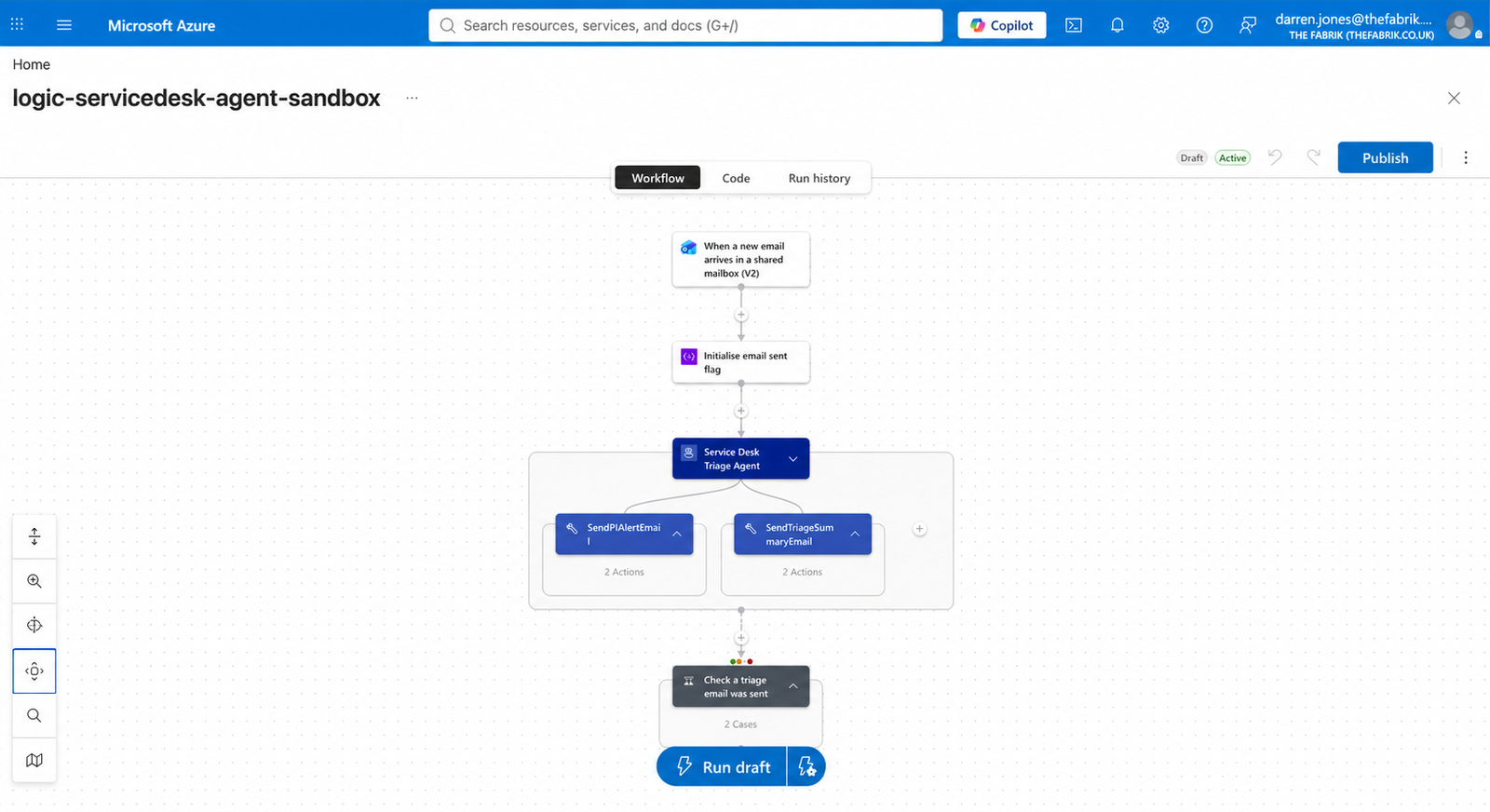
The workflow watches a shared service desk mailbox. When a new request arrives, the agent:
- reads the subject and body;
- classifies the request as Access & Accounts, Hardware, Software, Network, Data & Reporting, or Other;
- assigns a P1–P4 priority and gives a reason;
- labels the sender’s tone as calm, frustrated or urgent;
- writes a one-sentence summary and a suggested first response; and
- selects either a P1 alert tool or a standard triage-summary tool.
The model selects the tool. The workflow does not contain a conventional branch that checks whether the priority equals P1.
How the Azure Logic Apps workflow is built
1. Shared-mailbox trigger
The trigger polls the shared mailbox once a minute. It ignores messages whose subject starts with [ because the workflow sends its triage summaries back to the same mailbox. Without that guard, it could process its own output repeatedly.
2. Agent loop and tools
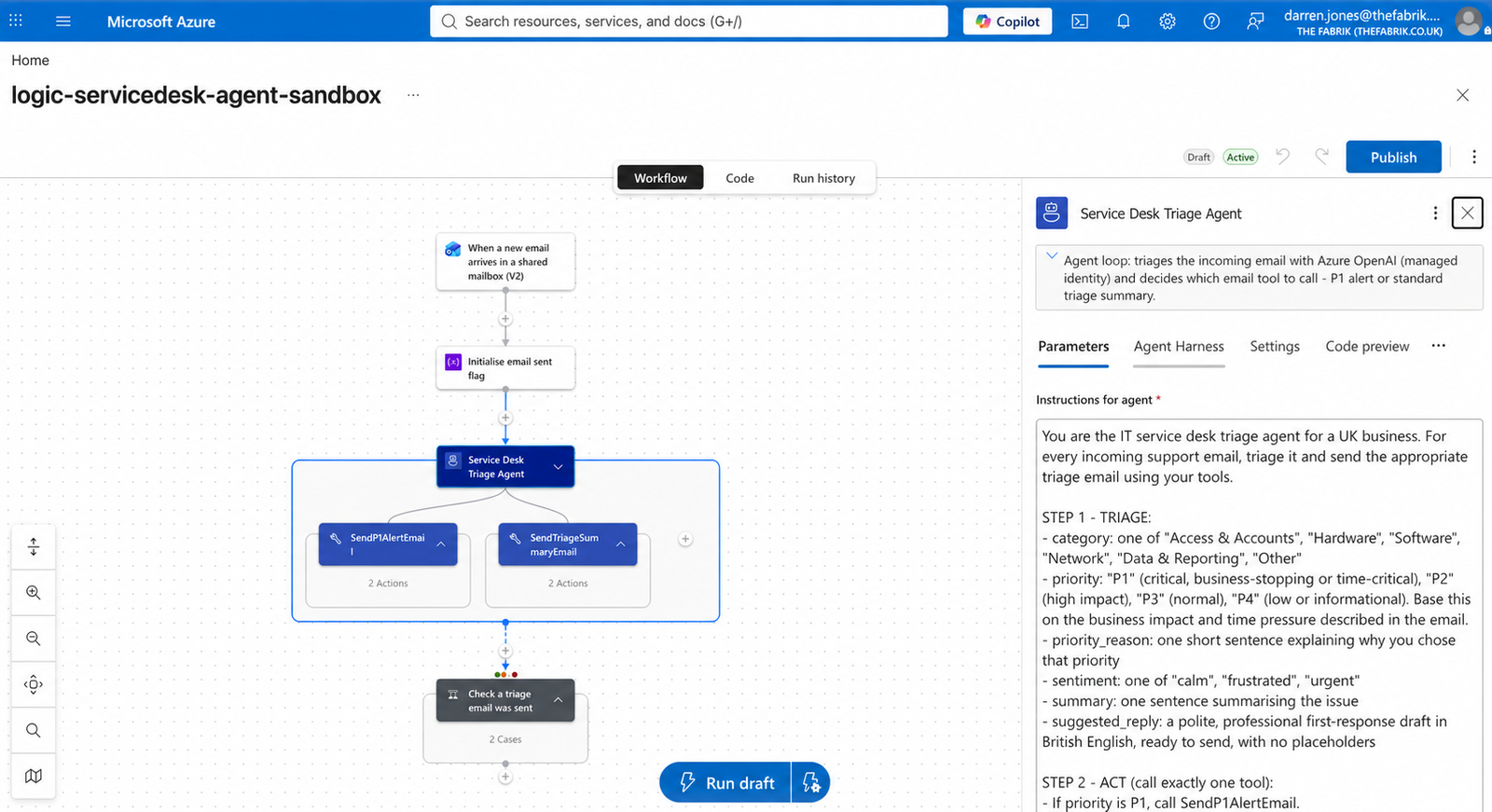
A single Logic Apps agent action uses a GPT-4o deployment in Azure OpenAI. Its system prompt describes the triage task. Two email tools accept defined parameters for the category, priority, reasoning, sentiment, summary and draft response.
Strict parameter schemas mattered. Without them, the model guessed field names and the tool calls failed.
3. Outcome-based fallback
Each email tool sets a boolean flag after it sends. When the agent action ends, a final check looks at the flag. If no triage email was sent, the workflow sends a [NEEDS MANUAL TRIAGE] message.
This does not rely only on the action status. During testing, the agent reached its iteration limit after a tool error, yet the action reported Succeeded. Verifying the outcome caught a failure that status-only handling could miss.
4. Managed Identity authentication
The Logic App called Azure OpenAI through a system-assigned Managed Identity with the Cognitive Services OpenAI User role. We did not store an Azure OpenAI API key in this workflow.
In our build, keyless authentication also required the Azure OpenAI resource’s custom subdomain rather than its regional endpoint. Treat that as an implementation note from this sandbox, and check current Microsoft documentation before reproducing it.
Managed Identity is one control, not the whole security model. A production design still needs a review of permissions, network access, logging, retention and sensitive email content; our Power Automate consultancy applies the same governance and approval principles to Microsoft workflow automation. Our article on security risks in Microsoft automation covers why identity and connection design matter.
What the three tests showed
The category, priority and sentiment matched our expected outcome in all three test cases.
For the Excel crash, the agent’s recorded reasoning was: “Month-end deadline this week and repeated crashes causing data loss; high impact but not a complete outage.” It balanced a deadline and repeated disruption against the absence of a total outage, then selected P2.
The suggested replies were specific and written in British English. The P1 draft acknowledged the deadline, asked diagnostic questions and suggested a workaround while access was investigated.
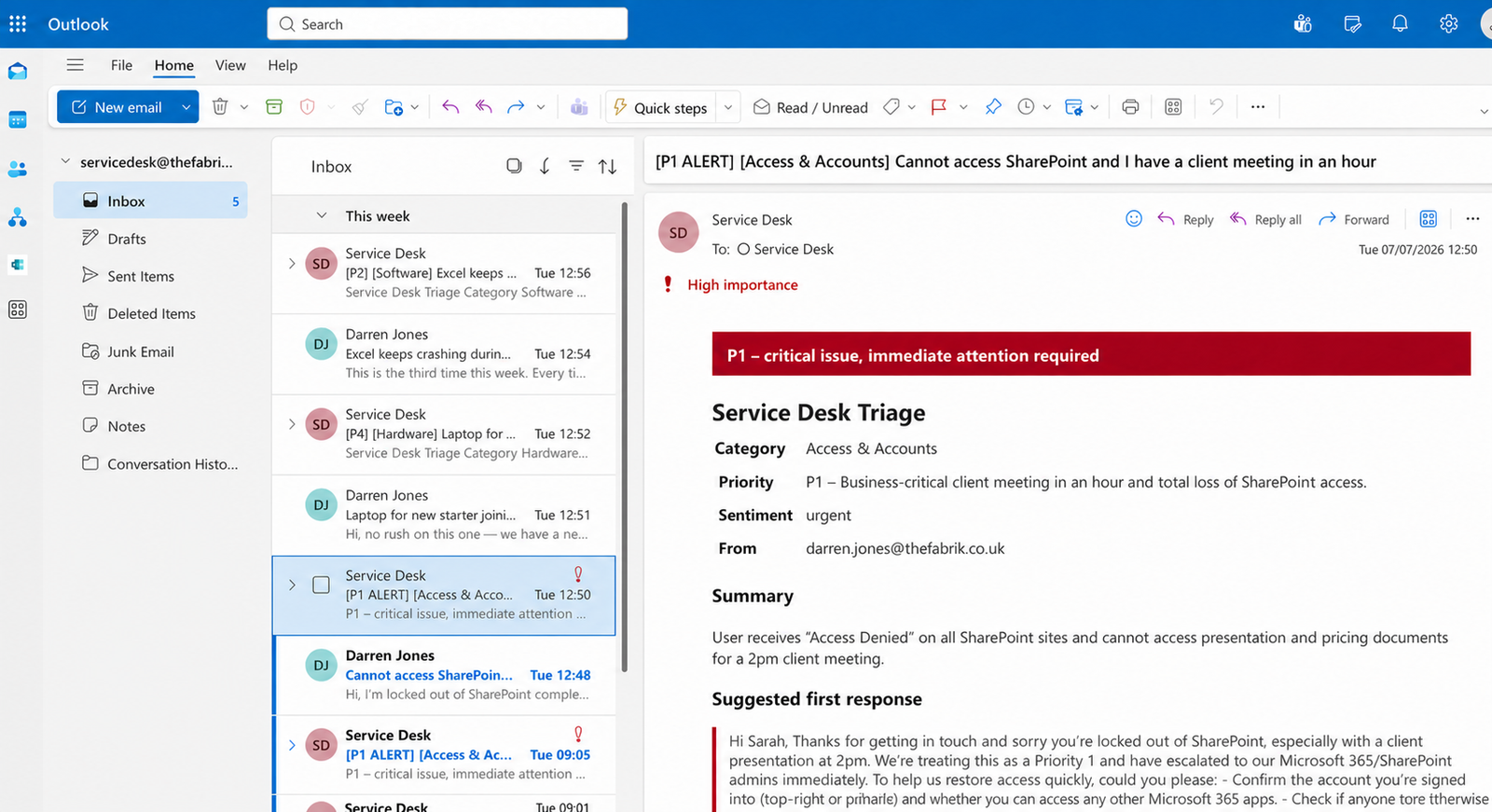
This only shows that the workflow worked in three sandbox cases. Three hand-written messages cannot establish a reliable accuracy rate. A real pilot would need a larger, representative set of anonymised requests, agreed expected outcomes and human review.
Three failure modes we found
The model guessed tool arguments
Without explicit parameter schemas, the model invented field names and the runs failed. Defining a strict schema for each tool fixed this in the test workflow.
Succeeded did not mean the intended outcome happened
A tool error caused repeated attempts until the agent reached its iteration cap. The action still reported Succeeded. The separate sent flag and manual fallback made the workflow check the business outcome, not just the platform status.
Similar triggers returned different field names
The shared-mailbox trigger returned camelCase fields where the personal-mailbox trigger used PascalCase. Our original references resolved to blank values, so the model was asked to triage empty content. Inspect the trigger output when an agent’s response looks unusually generic.
Why a human still approves the reply
The most important test failure was plausible rather than obvious. In the laptop case, the draft reply said: “Our standard provisioning timeframe is within five working days.”
That policy did not exist. The model supplied language that sounded normal for a service desk but was not grounded in our test environment. Another draft offered to grant temporary access “if appropriate”, which may not be a promise a real team wants made automatically.
That is why this workflow drafts a reply for the service desk rather than sending it to the requester. Automating classification and routing is one decision; authorising external communication is another.
People should also know when they are reading automated words. Our preferred starting position is AI-drafted, human-approved replies. Sentiment should be used as a limited triage signal, not as a judgement about an employee.
If you are considering this pattern for a shared mailbox or service desk, The Fabrik can help you design a small, controlled pilot with clear approval and fallback rules. Explore our controlled Azure agent-loop service or use the existing contact route to discuss the workflow you want to test.
From email triage to investigation and resolution
Only the first stage below was built and tested. The investigation and resolution stages are illustrative options for a future implementation, not results from this experiment.
Stage 1: triage (tested in this build)
Classify, prioritise, summarise, draft and route. Keep a manual fallback when the expected output is missing.
Stage 2: investigation (illustrative, not tested)
A future version could be given tightly scoped, read-only access to approved data sources. For a SharePoint access problem, it might query sign-in and audit data to assemble evidence about authentication failures, recent access changes or device compliance.
An implementation could use fixed, reviewed queries or allow a model to propose KQL for validation. Either way, the team would need to control accessible data, validate queries, handle incomplete logs and test the conclusions. This article does not claim that we connected or tested KQL, Microsoft Graph or Intune in this build.
Stage 3: resolution (illustrative, approval-gated and not tested)
A later workflow could present a diagnosis and a proposed, allowlisted action to an authorised person. If approved, the workflow could call a permitted API and then verify the result.
The specific actions available depend on the product APIs, connectors, permissions and organisational policy. Start read-only. Add narrowly scoped actions only after testing, security review and explicit approval design. Part 1 sets out the approval and verification guardrails.
Frequently asked questions
How accurate is an AI service desk agent?
Our agent’s category, priority and sentiment matched our expected outcome for three sandbox emails. That sample is too small to establish an accuracy rate. Test against a representative, anonymised set of your own requests and define what “correct” means before measuring it.
How much does an AI service desk agent cost?
Our three test runs used about 1,300 GPT-4o tokens per email. That is not a complete cost figure. Calculate the current Azure OpenAI price alongside Logic Apps triggers, actions, connector operations, logging and any connected services for your region and design.
Do I need ServiceNow or Jira?
Not for the mailbox-based pattern tested here. Our workflow read from and wrote to a shared mailbox. A service desk platform could be integrated later if its current connector or API supports the required operations.
Is it safe to let an AI agent read company email?
It can be designed with scoped access, but it is not automatically safe. Review data sensitivity, permissions, network controls, logging, retention, model configuration, fallback behaviour and human approval. In this test workflow, Managed Identity avoided storing an Azure OpenAI API key.
Can it reset passwords or restore access?
We did not test those actions. They may be possible through approved APIs or connectors, but consequential changes should be allowlisted, permission-scoped, approval-gated, logged and verified.
Why use Logic Apps instead of Power Automate or Copilot Studio?
The right choice depends on the workflow, identity model, Azure integration and operating team. Logic Apps suited this Azure-based experiment and its Managed Identity setup. For a broader comparison, see our guide to choosing between Power Automate, Logic Apps and other automation tools.
The interesting result was not that an agent can draft a response. It was how much depends on the quality of the underlying Microsoft setup: permissions, file structure, source data and the workflow around the agent. Our Microsoft 365 adoption service starts with the use cases worth fixing first.
Should you pilot an AI service desk agent?
An AI service desk agent is worth testing when a team repeatedly reads, categorises and routes similar requests, but the first pilot should be deliberately narrow.
Use a representative test set. Agree the priority rules. Keep external replies human-approved. Record when the agent abstains or fails, not just when it produces a plausible answer.
Considering AI triage for a shared inbox? Tell us what arrives, what must stay human-approved and which Microsoft services you already use. Contact The-Fabrik to discuss a small, controlled pilot.
Darren Jones is the founder of The-Fabrik, a Manchester-based Microsoft consultancy. This build, its three tests and the timings reported here came from The-Fabrik’s sandbox tenant in July 2026. No production benchmark or client result is claimed.